This comprehensive guide to AI worksheet generators walks through how these tools work, what to expect from free vs. paid options, how to differentiate effectively, and how teachers are actually using them in class.

If you’ve ever searched for an AI worksheet generator, you were probably trying to solve a very practical problem - not explore a new trend.
Maybe you needed a worksheet quickly. Maybe you wanted different versions for different students. Or maybe you were simply tired of rewriting the same questions again and again. I’ve seen this search come up at all stages of teaching from lesson planning late at night to last-minute prep before class.
The challenge is that once you start looking, you’re flooded with answers that don’t quite help. Some pages only list tools. Others only explain how AI works. Very few actually address the real questions teachers ask: Can this align with my curriculum? Can I differentiate properly? Is it safe? Is it worth paying for? How does this fit into my classroom workflow?
This page is here to answer those questions - clearly, practically, and without forcing you into a single way of working. I’ll walk through how AI worksheet generators actually work, when they’re useful, where their limits are, and how teachers use them in real classrooms.
You won’t find hype here - just the context you need to decide whether (and how) AI belongs in your worksheet-creation process.
An AI worksheet generator is a tool that helps you create worksheets by turning a topic, concept, or instruction into ready-to-use questions automatically.
Instead of starting with a blank page, you describe what you’re teaching like a math concept, a reading passage, or a science topic and the tool generates questions based on that input.
It’s important to note that an AI worksheet generator doesn’t replace your teaching judgment. Think of it as a support tool: it helps you move faster, but you still decide what works for your students and your curriculum.
At a high level, an AI worksheet maker works by analyzing patterns from large sets of educational content and using those patterns to generate new questions.
When you enter a topic, grade level, or instruction, the AI predicts what types of questions usually fit that context. That’s why many online worksheet generators ask for details like difficulty level or question type - the more context you give, the better the output tends to be.
That’s why reviewing the worksheet is essential. The AI can generate relevant questions quickly, but it doesn’t fully understand your classroom, your students, or your learning objectives the way you do.
Most AI worksheet generators can create a range of common worksheet formats that teachers already use regularly.
These typically include:
Some tools like Monsha can also generate variations of the same worksheet, which is helpful if you need multiple versions for different students.
However, the quality and flexibility depend heavily on the worksheet generator you’re using and how much control it gives you over difficulty and structure.
Yes. And this is usually the first reason you try an AI worksheet generator.
When you tell an AI worksheet generator what subject you’re teaching, the grade level, and the learning goal, it can generate worksheets that align closely with what you already teach in class.
I’ve seen teachers use this to quickly create worksheets that follow their curriculum without starting from scratch every time.
What matters is that you stay in control. You can tweak the wording, adjust difficulty, or reorder questions so the worksheet matches your pacing and classroom style. Used this way, an AI worksheet generator doesn’t replace your curriculum, it supports it and saves you time.
In day-to-day classroom use, you can rely on AI-generated worksheets, especially for practice, revision, and formative assessments.
An AI worksheet generator follows clear rules and patterns when it creates questions, which is why the output is usually consistent and usable right away. I always recommend doing a quick review, not because the worksheet is untrustworthy, but because you know your students and context better than any tool.
Think of it the same way you’d review a worksheet from a textbook or an online worksheet generator. The AI gives you a strong starting point, and you make the final call before using it in class.
AI can create math worksheets with equations, including algebraic expressions and multi-step problems, but complexity matters.
Most AI worksheet generators handle:
They may struggle with:
For many classrooms, especially at elementary and middle-school levels, AI-generated math worksheets are more than sufficient as practice material. At higher levels, they work best as a starting point that you refine, rather than a finished product you use as-is.
Yes, many AI worksheet generators like Monsha can generate answer keys.
When you’re using objective questions like multiple choice, fill-in-the-blanks, or short answers AI-generated answer keys are usually accurate and easy to work with. This is especially helpful when you’re creating practice worksheets or quick checks for understanding.
Yes, you’ll find several free AI worksheet generators for teachers online, and many of them let you create worksheets without paying upfront.
If you’re just getting started, a free online worksheet generator can help you generate questions quickly, test ideas, or prepare simple practice sheets. For occasional use, this can already feel like a big upgrade over starting from a blank document every time.
The key thing to remember is that free tools are designed to help you try the workflow and not necessarily support everything you do in class on a daily basis.
The biggest difference usually isn’t whether the worksheet works, it's how much control you get.
With free AI worksheet generators, you may be limited in:
Paid AI worksheet generators are typically built for regular classroom use. They give you more flexibility to adjust questions, align worksheets closely to your lessons, and reuse content across classes without friction.
If you find yourself spending time working around a free tool’s limits, that’s often the signal to look at paid options.
From what I’ve seen, free AI worksheet makers work best when you treat them as a starting point.
They’re usable when:
If you rely on worksheets daily or need consistent differentiation, free tools may start to feel restrictive. At that point, the question shifts from “Is this free?” to “Does this fit how I teach?” and that’s a much more useful way to decide.
Paying for an AI worksheet generator usually makes sense when it becomes part of your regular planning routine.
If you’re creating worksheets often, adjusting difficulty levels, or working across multiple classes, a premium tool can save you enough time to justify the cost. You’re not paying for “AI” - you’re paying for control, consistency, and speed.
For many teachers, the decision isn’t about replacing their judgment. It’s about removing repetitive work so they can focus more on teaching and less on formatting.

For me, the best AI worksheet generator is the one that quietly removes friction from your planning process. You don’t have to fight the tool or adapt your teaching style to it. Instead, it adapts to how you already work.
When an AI worksheet generator understands grade level, learning objectives, and difficulty, it starts producing content that feels relevant rather than generic. That’s usually the point where it stops feeling like a novelty and starts feeling like part of your regular workflow.
If you enjoy building worksheets manually and already have formats you like in Word or Canva, manual creation may still feel comfortable. You have complete control from the start, and you know exactly what the final worksheet will look like.
An AI worksheet generator becomes useful when content creation is what slows you down. If you’re spending most of your time thinking through questions rather than formatting them, AI can help you get to a solid first draft faster. Many teachers end up using AI for generating questions and then refining the final worksheet in tools they already trust.
This shift usually happens naturally. If you find yourself creating worksheets frequently and adjusting them for different groups of students, a free AI worksheet generator may start to feel limiting.
At that point, paying for a tool isn’t about unlocking features for the sake of it. It’s about reducing repeated effort. When an AI worksheet generator saves you time week after week, the value becomes clear without needing much justification.
Template-based tools like Canva are most useful when you already know exactly what you want to teach and just need a clean way to present it. For example, if you’ve taught the same topic for years and already have the questions in mind, a template helps you focus on layout, spacing, and visual clarity without rethinking the content.
An AI worksheet generator is more helpful when creating the questions themselves is what takes time. If you’re teaching a new topic, adjusting difficulty for different students, or need multiple versions of the same worksheet, AI helps you get the content in place quickly.
In practice, many teachers don’t choose one over the other. You might use an AI worksheet generator to create or adapt questions, then move the final worksheet into a template tool so it looks exactly the way you want for your class. Used together, AI handles the thinking work and templates handle the presentation.
When you create a worksheet with Monsha, the process is intentionally simple because you already have enough to think about.
You start by telling Monsha what you’re teaching - the subject, topic, grade level, and the kind of questions you want. From there, Monsha’s AI worksheet generator creates a draft worksheet based on that context. I like to think of it as skipping the blank-page stage entirely.
Once the worksheet is generated, you can review the questions, tweak wording, regenerate individual questions if needed, and shape the worksheet so it fits your lesson. You’re not locked into the first output, you’re guiding it until it feels classroom-ready.
If you already have worksheets you trust, Monsha makes it easy to reuse them instead of starting over.
With Monsha’s, you can upload a PDF or add an existing document as a source. Monsha then reads that material and creates a worksheet based on the content you’ve provided. This works especially well when you want to turn textbook pages, old worksheets, or reference material into fresh practice questions.
What I find helpful here is that you stay anchored to your original material. Monsha isn’t guessing the topic; it’s working directly from the content you already use, which makes the resulting worksheet feel familiar rather than generic.
With Monsha, you can adapt a worksheet to Bloom’s Taxonomy if you want students to analyze or evaluate instead of just recall. You can adjust Depth of Knowledge (DOK) levels when you want deeper reasoning, or set Lexile levels so reading difficulty matches your students’ needs.
That means you can take the same concept and create multiple versions of a worksheet - one for revision, one for deeper understanding, and one for challenge - without rewriting the content each time. You’re shaping learning intent, not just question count.
Once the worksheet is generated, Monsha’s editor gives you full instructional control. You can edit questions directly, add images for visual context, insert tables, include equations, link out to URLs, or restructure questions entirely.
If a question needs clearer instructions or better scaffolding, you change it right there - no workarounds, no exporting to another tool.
Yes and this is where Monsha is designed to fit into how you already work.
When you create worksheets in Monsha, you’re not locked into a closed system. You can export or share worksheets in formats that work with common classroom platforms, including Google Classroom and other learning management systems.
That means you can generate the worksheet using AI, review and customize it, and then distribute it through the same channels your students are already familiar with.
This is an area where a basic worksheet generator often falls short, but Monsha is built to handle it properly.
When you’re working with different languages, symbols, or subject-specific notation, Monsha allows you to review and edit everything directly in the editor.
You can adjust language, rewrite instructions, and ensure clarity before sharing the worksheet with students. For subjects like math or science, being able to include equations and structured formatting makes a big difference in how students understand the questions.
Because you’re not restricted to plain text, you can make sure the worksheet reflects how the content is actually taught in your classroom.
Yes and this is one of those details that really matters once you start using worksheets regularly.
With Monsha, you’re not creating worksheets for just one format or one platform.
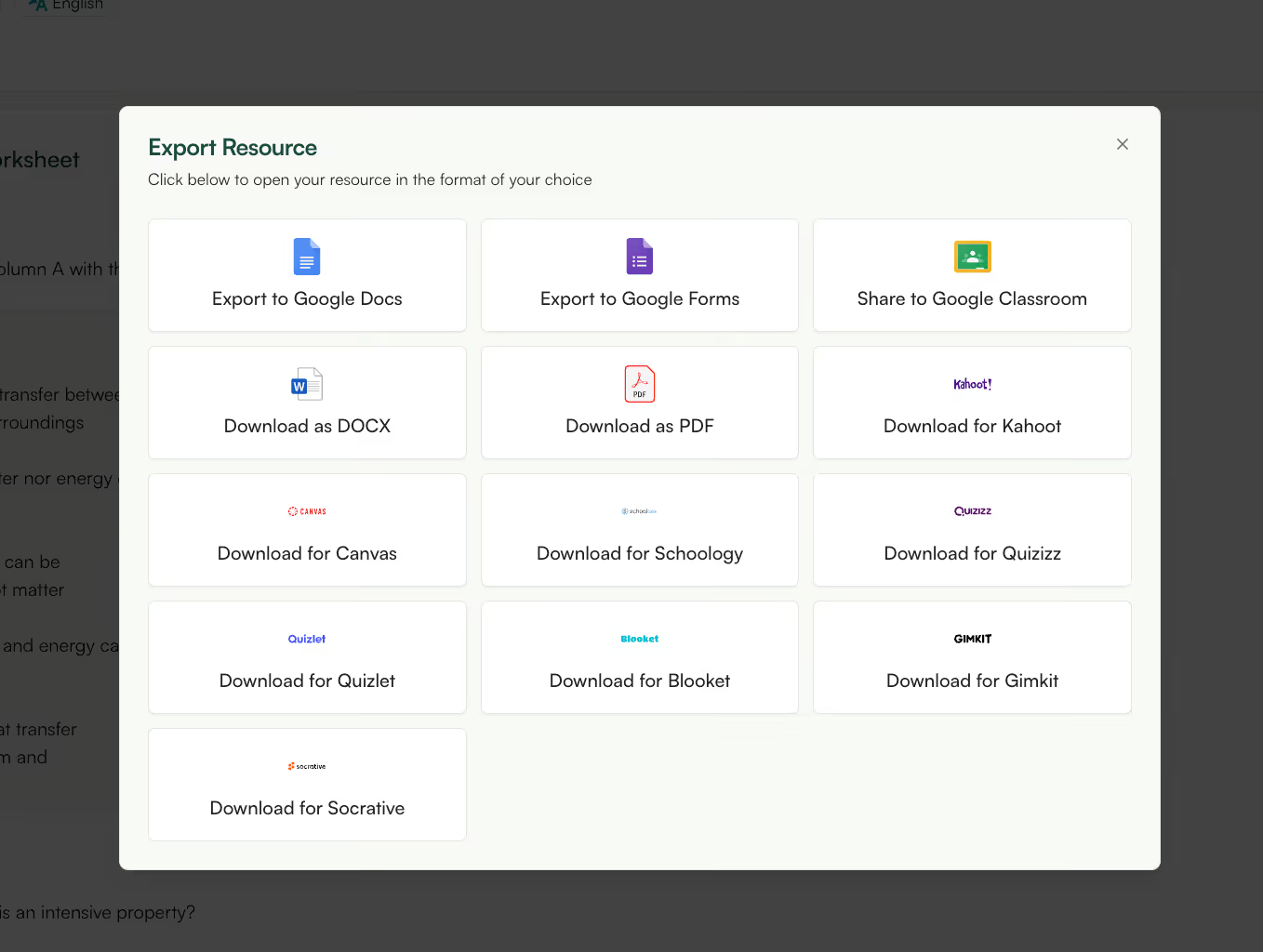
After generating and customizing a worksheet, you can export it in the format that fits how you plan to use it next. If you need something printable, you can download the worksheet as a PDF or DOCX and use it offline in class. If you’re working digitally, you can export directly to Google Docs or Google Forms without rebuilding anything.
What I find especially useful is that Monsha doesn’t stop at documents. You can export worksheets in formats designed for classroom tools you might already use - like Google Classroom, Canvas, Schoology, Quizizz, Kahoot, Quizlet, Blooket, Gimkit, or Socrative. That means the same worksheet can turn into an interactive activity, a homework assignment, or a live classroom quiz, depending on what you need that day.
From your point of view, this flexibility removes friction. You create the worksheet once, then decide how and where to use it - online, offline, printed, or interactive - without duplicating work or reformatting content.
This is a valid concern, and you’re right to think about it before using any tool regularly.
When you use an AI worksheet generator like Monsha, you don’t need to upload student data to create worksheets. You’re generating content based on topics, sources, or learning goals, not individual student information. That means you can plan lessons and create materials without exposing personal data.
From a practical standpoint, this keeps your workflow simple and safe. You’re using AI to prepare teaching resources, not to track or profile students, which makes it easier to use responsibly in a classroom setting.
In Monsha’s case, worksheet creation is focused on content, not on collecting student-level data.
When you generate a worksheet, the system stores the resource so you can reuse or edit it later, but it doesn’t require you to attach student identities or sensitive information.
This separation is important because it lets you benefit from AI-powered creation without turning your worksheets into data records about your students.
As always, it’s a good habit to review what information you’re sharing with any educational tool, but for worksheet generation, you can stay firmly on the content side rather than the data side.
This is another question many teachers ask, even if they don’t say it out loud. Short answer? No, AI-generated worksheets are not inappropriate for students.
AI-generated worksheets are created based on patterns in educational content, which means they reflect common language and structures.
That’s why your role as a teacher still matters. When you review a worksheet, you’re checking not just for correctness, but also for tone, inclusivity, and suitability for your students.
The good part is that tools like Monsha make it easy to adjust wording, reframe questions, or remove anything that doesn’t feel right. You’re not locked into the output. You’re shaping it, the same way you would with any teaching resource you plan to use in class.
One common mistake is treating the first generated worksheet as a finished product. An AI worksheet generator is designed to help you move faster, not to replace your professional judgment. When you take a moment to review instructions, adjust wording, or refine question flow, the worksheet becomes far more effective.
Another mistake is using AI-generated worksheets without clearly defining the learning goal first. When you’re clear about what students should practice or demonstrate, the output feels focused. Without that clarity, even a well-written worksheet can miss the mark.
AI worksheet generators are most helpful when repetition and variation are part of the task. If an activity depends heavily on discussion, creative writing, or open exploration, a worksheet, AI-generated or not, may not be the right format.
There are also moments when a simple conversation, hands-on activity, or group exercise does more for learning than any worksheet. Knowing when not to use a worksheet is just as important as knowing how to create one.
Reviewing an AI-generated worksheet doesn’t have to be time-consuming.
I usually start by checking whether each question actually supports the learning objective. Then I look at clarity, whether the instructions make sense for my students and finally at progression, making sure the worksheet flows from simpler questions to more challenging ones.
With Monsha’s editor, this process stays quick. You can rewrite prompts, reorder questions, add context, or remove anything that doesn’t fit. The goal isn’t perfection; it’s alignment. When the worksheet matches your intent, the AI has done its job.
If you’re specifically looking for free AI worksheet makers, there are a few tools teachers commonly start with.
Monsha is often used when you want more than just basic question generation. Even on the free tier, you can create AI-generated worksheets, customize questions, and work with real teaching material. It’s especially useful if you care about differentiation and want the worksheet to align with how you actually teach, not just generate random questions.
MagicSchool is another popular option teachers explore early on. It’s designed to be simple and quick, which makes it useful for generating basic worksheets or practice questions without much setup. Many teachers use it for quick drafts or idea generation rather than long-term worksheet reuse.
Flint is often used for lightweight worksheet and activity creation, particularly when teachers want something fast and conversational. It works well for experimentation or short classroom activities, though customization and reuse options are usually more limited compared to more full-featured tools.
All three AI worksheet generators can work well, depending on what you need. If you’re creating worksheets occasionally, free tools like these are often enough.
As soon as you start creating worksheets regularly, adapting them for different students, or exporting them across formats and platforms, the differences between tools become much more noticeable. That’s usually when teachers start prioritizing flexibility, differentiation, and reuse over simple generation.
When you differentiate worksheets with AI, you’re not just changing the difficulty label - you’re changing what the student is asked to do with the same concept. In practice, that usually means generating different versions of a worksheet where one student might identify or recall information, another explains or applies it, and another analyzes or justifies an answer. The topic stays the same; the cognitive demand changes.
AI also makes it easier to adjust reading load and scaffolding without rewriting everything yourself. You can create one version with shorter sentences and more guided prompts, and another with denser language or fewer hints.
This is especially useful when students understand the concept but struggle with comprehension, or when you’re teaching mixed-ability groups in the same classroom.
Tools like Monsha are built around this exact use case. Instead of manually creating three or four worksheets, you can generate a base worksheet and then ask the AI to create differentiated versions using familiar teaching frameworks - like Bloom’s Taxonomy or Depth of Knowledge - while also adjusting reading levels or question structure. You decide the intent for each group; the AI handles the rewriting.
What keeps this practical is that you can still review and edit every version. You’re not handing over differentiation to the tool - you’re using AI to apply it consistently and quickly, so differentiation feels planned and intentional instead of rushed or improvised.
Different subjects place different demands on worksheet creation, and this is where general tools can fall short.
For math, you need support for equations, structured problem formats, and clear progression. For ELA and reading, you care more about passage handling, comprehension questions, and reading levels. For language learning, clarity, tone, and structure matter even more.
With Monsha, you’re not switching tools by subject. You can generate worksheets across math, reading, writing, and languages while adjusting frameworks like Lexile levels, Bloom’s Taxonomy, or Depth of Knowledge depending on what you’re teaching. That consistency makes planning easier when you’re teaching multiple subjects or grade levels.
This is often a deciding factor.
If a worksheet generator forces you to rebuild content elsewhere, it quickly becomes more work than help. With Monsha, you can export or share worksheets directly into environments you already use, including Google Classroom and other LMS platforms.
From your perspective, that means worksheet creation stays in one place, while distribution happens where your students already are. You don’t need to copy, paste, or reformat just to get content into your classroom workflow.
By now, one thing should be clear: an AI worksheet generator isn’t about replacing how you teach. It’s about removing the repetitive parts of worksheet creation so you can spend more time focusing on learning itself.
Used well, AI helps you generate questions faster, differentiate intentionally, and adapt worksheets to real classroom needs.
With Monsha's AI worksheet generator, you can generate highly customizable worksheets designed to fit within broader lesson plans, course materials, and curriculum standards. Here’s a video tutorial showing how to create amazing worksheets for your students:
Unlike most AI generators that produce generic worksheets from prompts, Monsha’s free AI worksheet generator allows teachers to create worksheets based on any source materials (text, PDFs, web links).
Try it now — no need to switch tabs
Describe your worksheet topic below, pick your activity types and grade, and Monsha will build it for you in seconds.
Key Features:

So, start creating customized worksheets and try Monsha today.




AI in Education Content
Pooja Uniyal works closely with teachers and schools to understand and guide how AI is being used in real classrooms today. Her work at Monsha focuses on capturing practical teaching workflows and turning them into clear, usable guidance for educators exploring AI in their daily planning.
Join thousands of educators who use Monsha to plan courses, design units, build lessons, and create classroom-ready materials faster. Monsha brings AI-powered curriculum planning and resource creation into a simple workflow for teachers and schools.
Get started for free

.avif)
.avif)
.avif)