Learn the qualities of a good presentation and how teachers can improve presentation skills with practical, classroom-ready tips. See how AI tools like Monsha help create clearer, more effective presentations—without extra work.
.avif)

This is a question from a real teacher on Reddit. Unprofessional presentations are a pet peeve.
We know the issue behind this isn’t subject knowledge, you need to understand some core qualities of a good presentation.
In real classrooms, a presentation isn’t just about putting information on slides. The characteristics of a good presentation is how you introduce ideas, and connect them to practices. When that structure breaks down, even well-prepared lessons fall flat.
A good classroom presentation isn’t dense, flashy, or over-designed. It’s clear, intentional, and built around how students actually process information.
Yet most teachers were never trained in presentation design for classrooms. As a result, they rely on trial and error and reuse old decks, overload slides, or rush through explanations, simply because there’s no time to do otherwise.
That’s why in this guide, we’ll break down 10 practical ways to improve presentation skills for teachers. All of these clearly focus on classroom realities, not corporate slide rules. You’ll see how small presentation decisions can lead to better attention, clearer understanding, and smoother lessons, and how modern tools can support this process without adding to your workload.
.avif)
A good presentation does more than share information, it helps your students understand, remember, and apply what’s taught. Unlike a corporate presentation that aims to sell ideas, report outcomes, or persuade stakeholders; classroom presentations must also check understanding and reinforce learning in the moment.
Here are key characteristics that define an effective classroom presentation, not just visually appealing slides, but presentations that support understanding and retention.
Every good presentation starts with a clear purpose: what should students understand or do after the presentation?
Presentations with explicit learning objectives help you design content that stays focused and relevant. Students are more likely to stay attentive when they know what they are learning and why it matters.
Good presentations guide students through ideas in a logical order - from simple to complex, from known to new. When you create a strong structure, students see relationships between points instead of feeling lost.
You have to use vocabulary and phrasing that match your students’ age and background. When language is too advanced or too simplistic, students struggle to connect with the lesson. A key characteristic of a good presentation is that it uses language students can understand without extra decoding.
Effective presentations use visuals that are purposeful, simple, and directly connected to what is being explained. They support your content, not distract students from it.
Presentations should include moments that invite student mental engagement - pausing to think, asking prediction questions, or checking understanding. Pauses are part of a feedback loop that tells you whether students are following or need clarification.
One of the most effective ways to improve presentation skills is before explaining a concept, you show students how it looks. This gives students something to relate to.
How does it fit a real classroom scenario?
Instead of saying this:
“Today we will learn fractions. A fraction represents a part of a whole.”
Do this:
Show an image of a pizza cut into 8 slices and ask:
“If I eat 2 slices out of 8, how many slices are left?”
Then after discussion, introduce the term fraction.
This simple shift improves classroom presentation skills because students engage immediately, understand the concept before the terminology and retain the idea longer.
Monsha’s online presentation maker helps here. Because with Monsha, you can generate images with AI to support your presentations. You can simply prompt the editor, “Show an image of a pizza cut into 8 slices and 4 slices and explain how fractions work.” The editor will come up with both images and text.
Why it works in classrooms:
In classroom settings, explanations without examples often lead to blank stares, repeated questions and re-teaching the same concept later. But with examples:
One of the most practical ways to improve presentation skills is to avoid explaining everything at once. Instead, break explanations into short, focused chunks that cover one idea at a time.
How does it fit a real classroom scenario?
Instead of explaining the entire chapter or concept in one continuous explanation, do this:
Explain one idea, pause, then move to the next.
For example, while teaching photosynthesis:
Why does it work in classrooms?
In real classrooms, students have short attention spans and long explanations make students zone out halfway through. But, when you break explanations into chunks:
It’s easy to give into the temptation of putting everything in 2-3 slides and be done with it. But it does more harm than good. Students find it hard to grasp the information cluttered into one slide.
How does it fit a real classroom scenario?
Instead of creating a slide that shows the full formula, all steps and the final answer, design the presentation so only one step appears at a time.
For example, in a math lesson:
Students focus on what’s in front of them, not on what’s coming next.
Now, you may feel it’s hard to create these many slides for a single topic. That’s where Monsha steps in. You just prompt Monsha to add only one step in a slide, and it will do that.
Even if you have an already designed presentation that you want to divide into smaller sections, you can do that with Monsha. Just add your presentation in a PDF format in Monsha and ask it to re-create the presentation. Or, if you want more control, use the editor to edit the presentation the way you want.
Why does it work in classrooms?
When slides show everything at once, students either rush ahead or stop listening.
Step-based worked examples work because:
If you want to keep your students hooked on your presentation, you should delay the answer in your presentation. Good presentations don’t rush to the answer, they create a moment of thinking.
How does it fit a real classroom scenario?
Instead of a slide that shows the question, the method and the final answer, design the presentation so the answer appears one slide later.
For example:
That one-slide delay gives students time to think before the reveal.
Why does it work in classrooms?
Prediction moments work because:
P.S. If you haven’t already, join our Facebook community to see how other teachers are using Monsha in their classrooms.

One of the most reliable ways to improve presentation skills is to make sure your spoken explanation and your visual content are saying the same thing, at the same time.
A good presentation doesn’t add more information visually, it anchors what’s being said.
How does it fit a real classroom scenario?
Instead of a slide filled with text that students read while the teacher explains something else, design the slide to show only the key idea being spoken.
For example:
Why does it work in classrooms?
When visuals and speech don’t align, students choose one and often miss the other.
Verbal and visual reinforcement works because:
You don’t have to redesign slides for every lesson. Instead, use the same slide structure every time you teach a concept and change only the content inside it.
How does it fit a real classroom scenario?
Instead of creating a new slide layout for every topic, keep the structure fixed.
For example, whenever you introduce a new concept, your presentation follows the same pattern:
Students quickly recognize what each slide is meant for.
They know:
Why it works in classrooms:
When slide structures change constantly, students lose time figuring out what matters.
A consistent slide structure works because:
Instead of ending a presentation with a summary or “thank you” slide, end it with a slide that clearly leads into practice.
How does it fit a real classroom scenario?
Instead of the final slide repeating what was taught, design it to show what students are expected to do immediately after.
For example, the last slide might show:
Why does it work in classrooms?
When presentations end without a clear next step, students hesitate and teachers have to explain instructions again.
A practice-ready ending works because:
Instead of full paragraphs, use short keywords or phrases that support what you’re saying out loud.
This is a core characteristic of a good presentation for the classroom - slides guide attention, they don’t compete with the speaker.
How does it fit a real classroom scenario?
Instead of a slide filled with sentences explaining a concept, design the slide to show only the key terms.
For example, while explaining a science process:
Students listen first and glance at the slide only to anchor the idea.
Why does it work in classrooms?
When slides are packed with paragraphs, students either stop listening or try to copy everything.
Keyword-based slides work because:
Your classroom constitutes students with different learning abilities. That’s why it’s important to design presentations that align with different cognitive and reading levels - not just different speeds.
Instead of using the same presentation for every group, differentiate it using frameworks like Bloom’s Taxonomy, Depth of Knowledge (DOK), or Lexile levels.
How does it fit a real classroom scenario?
Instead of one presentation that explains a concept at a single level, structure slides to match different levels of thinking.
For example, while teaching the same topic:
Although this is a good way to improve your presentations based on Bloom’s Taxonomy, DOK and Lexile levels, it’s hard for you to create these many versions.
That’s why you need Monsha. You can generate multiple versions of the same presentation aligned to Bloom’s Taxonomy, Lexile levels, or DOK levels, while keeping the slide structure consistent.
Why does it work in classrooms?
When presentations are not differentiated, teachers end up verbally compensating for slides that don’t match student ability.
Differentiated presentations work because:
One of the most effective ways to improve presentation skills today is to stop treating presentation creation as a manual task. When teachers build slides from scratch, the focus often shifts to formatting and speed, not clarity and structure.
A key quality of a good presentation is alignment with lesson objectives, student level, and assessment goals. This is where AI-powered presentation creation makes a meaningful difference.
Why does manual presentation creation break down?
We know you don’t struggle with ideas, you struggle with time.
When you create presentations manually:
As a result, presentations are often informative but not effective.
How does Monsha help you improve your classroom presentation?
With Monsha, you can generate beautiful presentations with any source - PDF, article, Youtube video or any Monsha resource. Then, you can customize your presentation based on a grade level or language.
You can also fine-tune your slides even more by choosing:
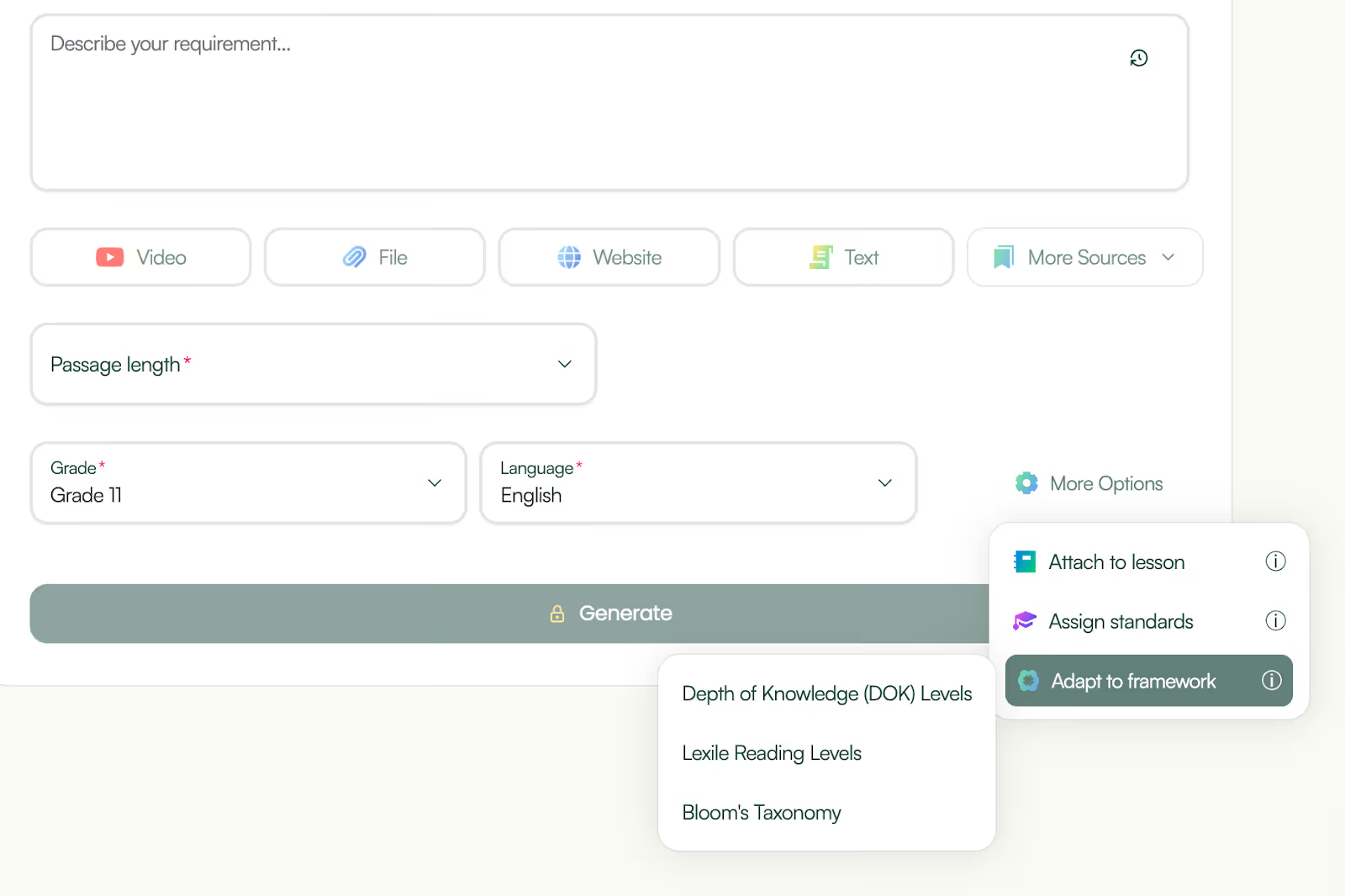
After you click ‘generate’, Monsha’s AI ppt maker will share an outline with you. This outline will have all the presentation content. You can review the text and tweak it right there - add bullet points, numerals, convert text to bold or italics - so your final presentation looks almost perfect.
Most AI presentation makers stop once the slides are generated. Monsha doesn’t. It gives you full control to refine, adapt, and build on your presentation, so it actually works in a real classroom.
Once your slides are generated, here’s what you can do next:
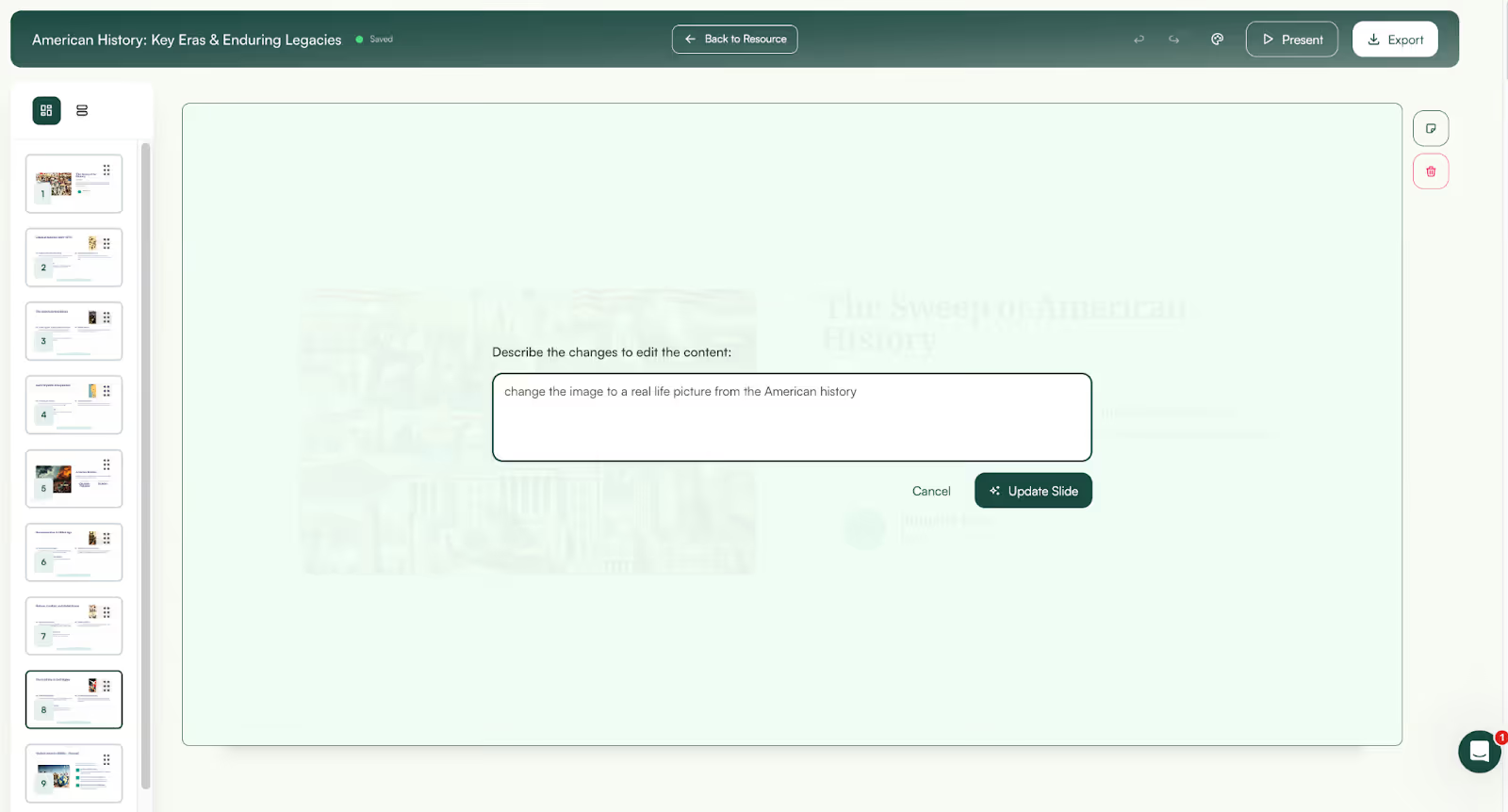
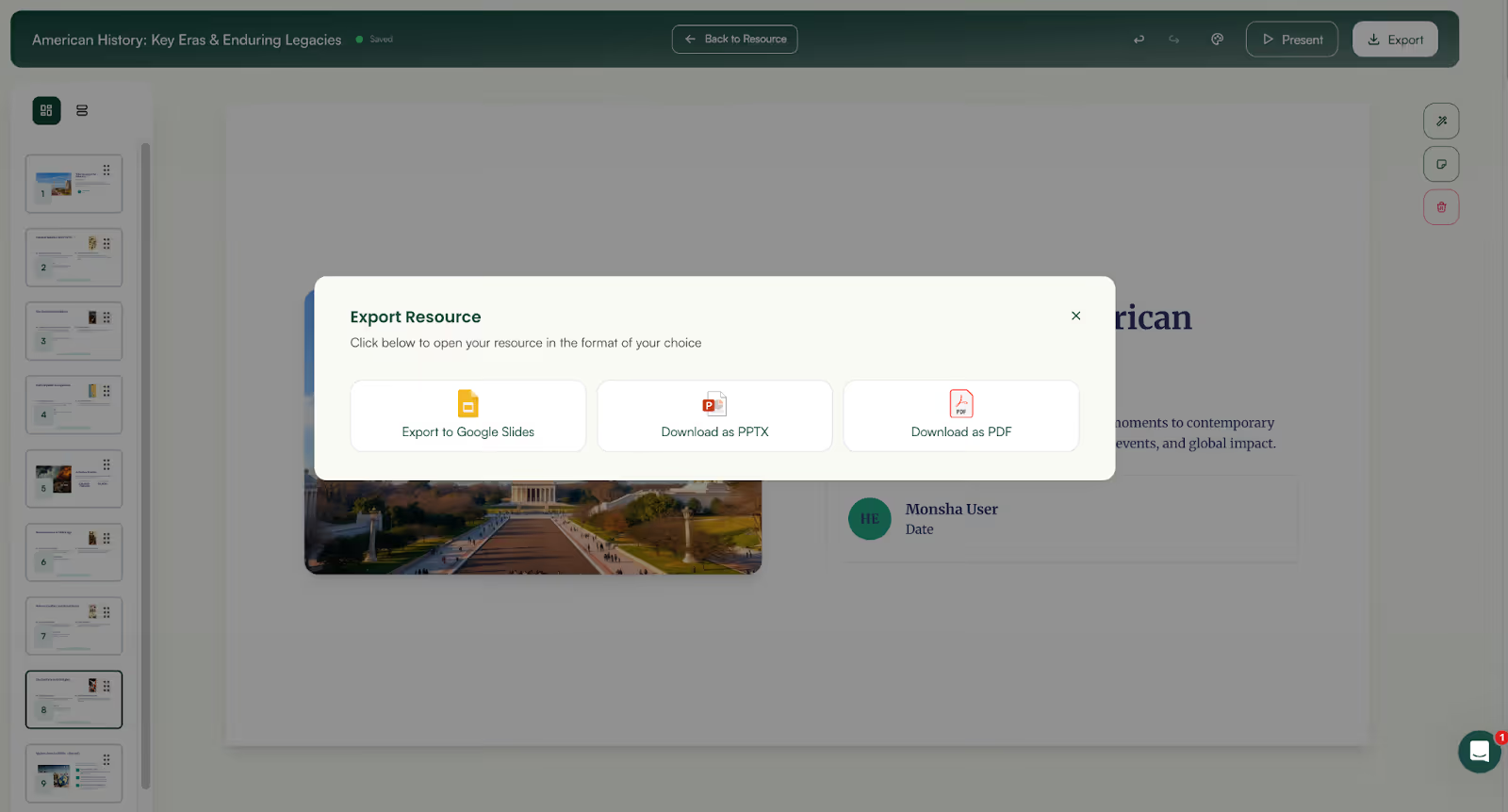
And because everything is saved in your Monsha account, your presentations are always available to revisit, update, or reuse whenever you need them.
Improving classroom presentations isn’t about adding more slides or better visuals. It’s about understanding the qualities of a good presentation - clear structure, logical flow, age-appropriate language, and reinforcement built into the lesson.
The problem is that doing all of this manually takes time. And when time is limited, presentations often end up rushed, overloaded, or reused even when they no longer fit the class.
That’s why one of the most effective ways to improve presentation skills is to use a tool that guides you through the right decisions automatically. Monsha is built around the characteristics of a good presentation, helping teachers create clear, well-structured, and classroom-ready slides without starting from scratch.
Instead of thinking about formatting, sequencing, or differentiation every time, Monsha’s workflow naturally leads you toward presentations that work - both visually and instructionally.
If you want presentations that look good and support real learning, improving the process matters more than improving the design. And that’s exactly where Monsha fits in.




AI in Education Content
Pooja Uniyal works closely with teachers and schools to understand and guide how AI is being used in real classrooms today. Her work at Monsha focuses on capturing practical teaching workflows and turning them into clear, usable guidance for educators exploring AI in their daily planning.
Join thousands of educators who use Monsha to plan courses, design units, build lessons, and create classroom-ready materials faster. Monsha brings AI-powered curriculum planning and resource creation into a simple workflow for teachers and schools.
Get started for free

.avif)
.avif)