The Best Vocabulary Worksheet Generators Teachers Actually Find Useful
Looking for a better way to create vocabulary worksheets without spending hours formatting documents? In this guide, we break down the best vocabulary worksheet generators, what they’re actually good at, and which ones are worth your time.
Vocabulary instruction works best when practice is consistent. But creating fresh vocabulary practice worksheets every week - ones that match your lesson, your students’ level, and your teaching goals - can quickly become repetitive and time-consuming.
By now, you must’ve done either of these three things:
Reusing old vocabulary worksheets that don’t fully match the lesson
Downloading generic worksheets and modifying them
Spending too much time building worksheets from scratch
But the market is flooded with vocabulary worksheet generators. It’ll take days to try them all. That’s why we did it for you.
We tried the best vocabulary worksheet generators and compiled a list of 5 tools for you. We covered their key features and pricing so you can finally pick one for yourself.
Let’s dive straight into it.
Best Vocabulary Worksheet Generators for Your Classroom
The right vocabulary worksheet tool depends on how you like to create your vocabulary practice worksheets. Some tools focus on design, others on AI generation, and some specialize in ready-to-use vocabulary worksheets.
Here are five strong options you can use to create a dependable vocabulary worksheet creator or vocab worksheet maker.
Generate vocabulary worksheets from any source material: Monsha works as a powerful vocabulary worksheet generator because you can create vocabulary practice worksheets from almost anything - PDFs, lesson notes, Google Drive files, YouTube videos, or website URLs.
Grade, language, and multilingual vocabulary support: You can choose the exact grade level and even translate worksheets into 60+ languages. This makes Monsha a strong vocabulary worksheet creator if you teach multilingual classrooms, ESL students, or international curriculam.
Advanced differentiation controls for vocabulary practice: Monsha allows you to adjust difficulty using Lexile levels, Depth of Knowledge (DOK), Bloom’s Taxonomy, and grade level. This helps you create differentiated vocabulary practice worksheets for struggling, on-level, and advanced learners without rewriting everything manually.
AI editor that lets you modify worksheets with simple prompts: Unlike many vocabulary worksheet makers where you must regenerate content, Monsha includes a powerful editor where you can refine instructions, add images, insert tables, embed videos, or restructure activities simply by prompting.
Use images for better context: With Monsha’s vocabulary worksheet generator, you can include images alongside vocabulary prompts so students connect the word, its meaning, and its context at a glance.
Flexible export options for any teaching workflow: After creating your vocabulary worksheets, you can export them to formats like PDF, DOCX, PPTX, Google Docs, Slides, images, or shareable links. This makes it easy to print vocabulary worksheets or assign them digitally.
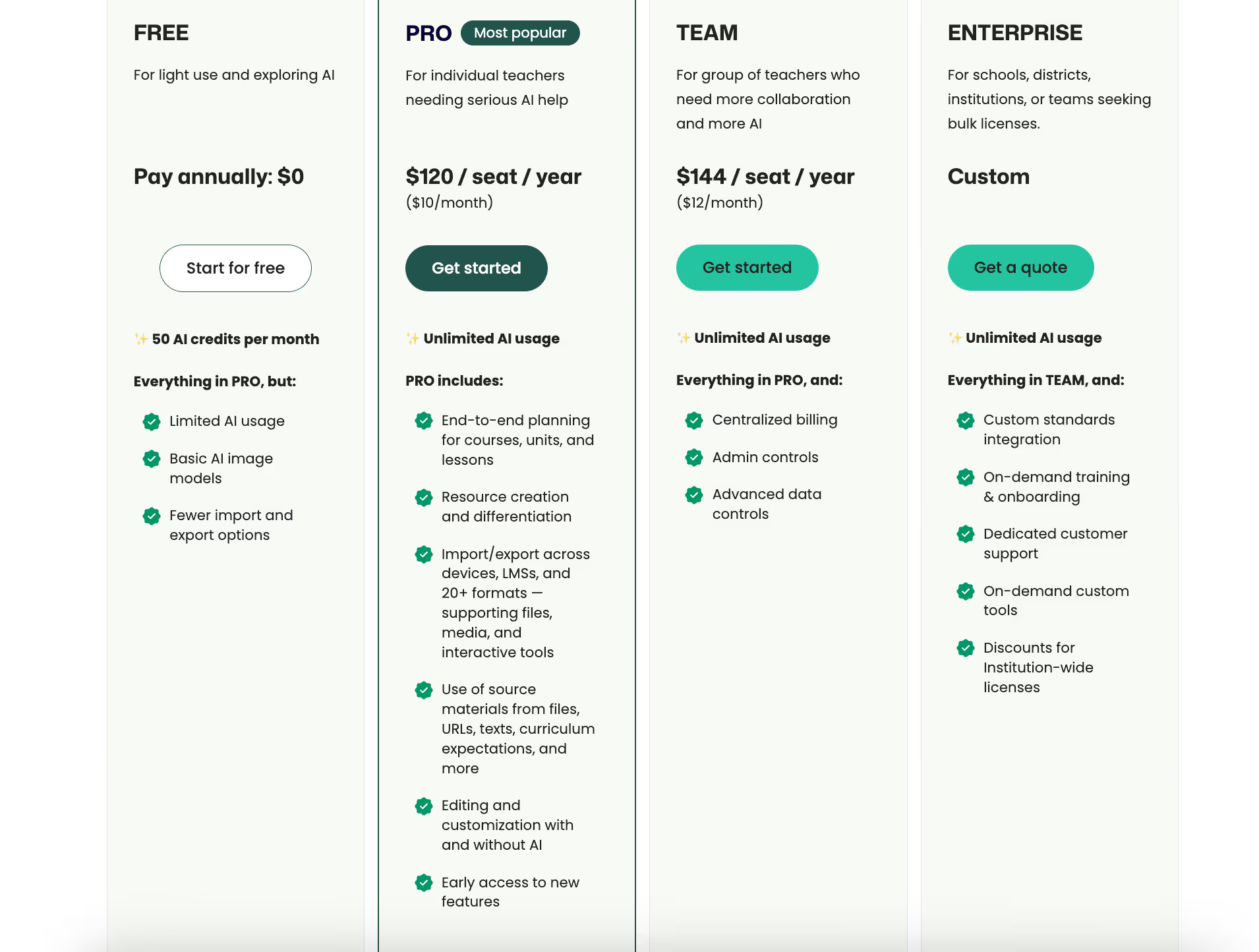
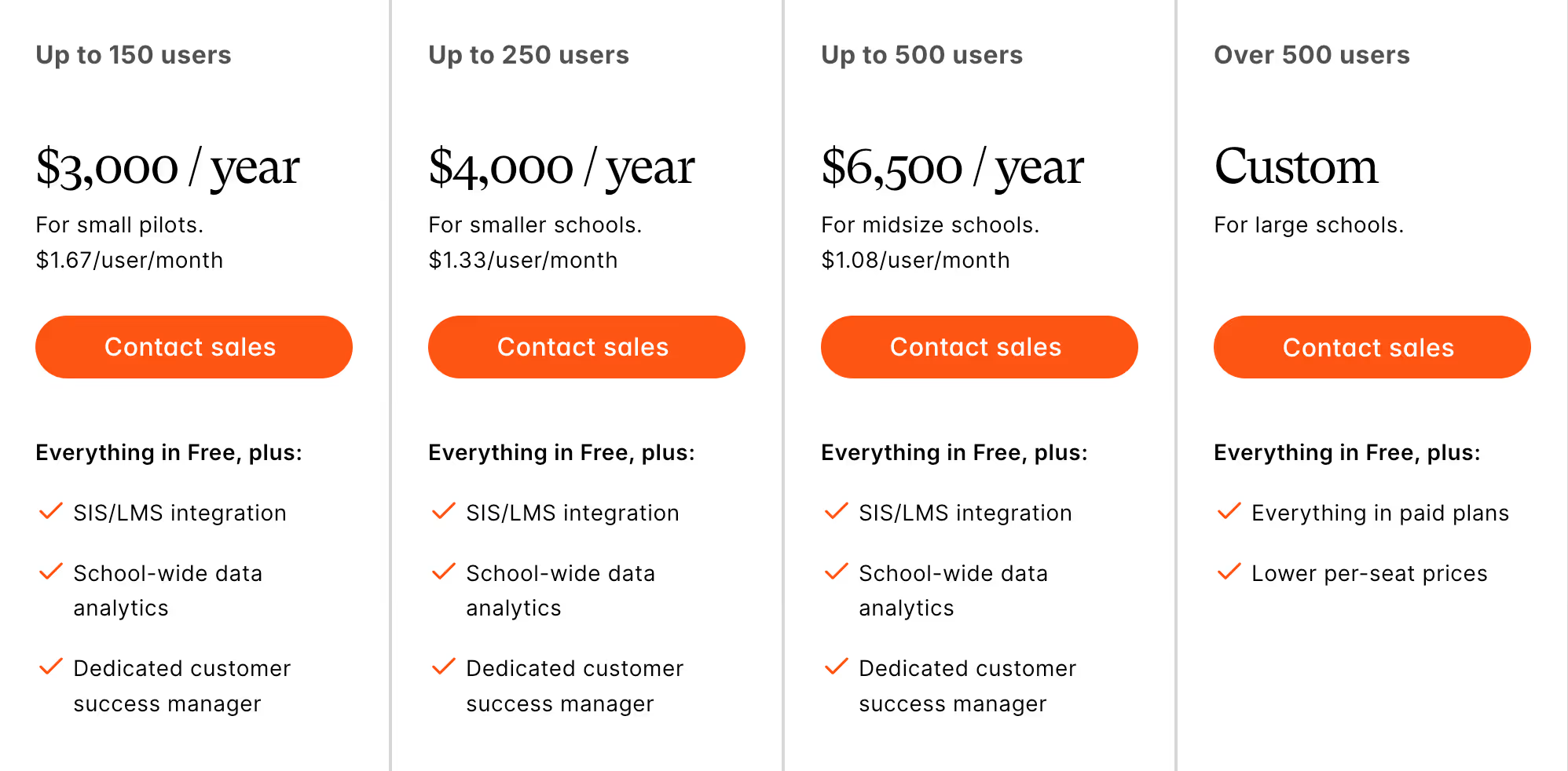
Pricing:
Canva
Best for: Teachers who want a highly visual vocabulary worksheet maker with full design control.
Key features:
Ready-to-edit vocabulary worksheet templates: Canva works as a flexible vocabulary worksheet generator because you can start with pre-designed worksheet templates and quickly adapt them into vocabulary practice worksheets by adding word lists, definitions, matching exercises, or fill-in-the-blank activities.
Drag-and-drop vocabulary worksheet creator: You can easily build your own vocabulary worksheets by dragging text boxes, shapes, images, and icons. This makes it useful when you want complete control over how your vocabulary exercises look instead of relying on auto-generated formats.
Built-in word activity formats: Canva includes design elements you can use to create vocabulary exercises like word searches, matching activities, crossword-style layouts, flashcards, and concept boxes. This makes it a practical vocab worksheet maker even though it's technically a design platform.
Full customization of instructions and difficulty: You can adjust instructions, add example sentences, include images for context clues, or scaffold vocabulary practice worksheets based on grade level. This is especially useful if you want differentiated vocabulary worksheets.
Export and sharing options for classroom use: Once your worksheet is ready, you can export it as a print-ready PDF, PNG, or share a link with colleagues. This makes Canva a practical vocabulary worksheet maker free option for teachers who want professional-looking printables.
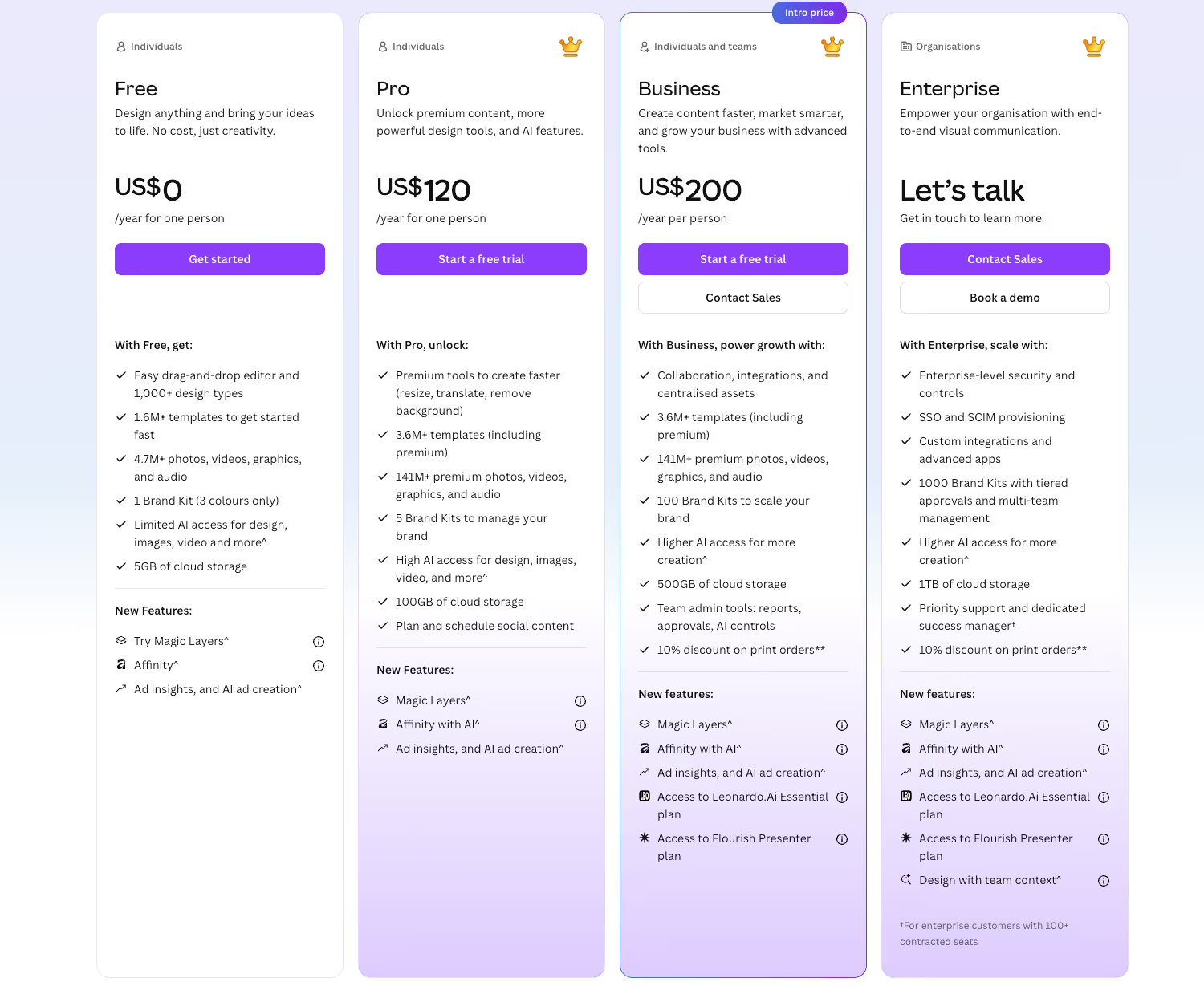
Pricing:
MagicSchool
Best for: Teachers who want an AI-powered vocabulary worksheet generator that saves prep time.
Key features:
AI vocabulary worksheet generator: MagicSchool functions as an AI vocabulary worksheet creator that can generate vocabulary exercises based on a topic, lesson text, or concept. It can create fill-in-the-blank questions, comprehension prompts, and word usage exercises automatically.
Vocabulary list generator for targeted practice: Instead of manually building word lists, you can generate vocabulary sets aligned with your lesson topics. This makes it especially useful if you regularly create vocabulary practice worksheets tied to reading passages.
Context-based vocabulary practice creation: MagicSchool can generate passages that include selected vocabulary words so students learn words in context rather than in isolation. This is useful for teachers focused on applied vocabulary learning.
Grade-level and standards alignment: You can adjust difficulty levels to match student ability or curriculum expectations. This helps when you need structured vocabulary worksheets aligned with learning outcomes.
Easy export and editing workflow: You can copy generated worksheets into Docs or export them for printing. This makes it useful when you want a fast vocabulary worksheet maker that integrates into your existing lesson planning workflow.
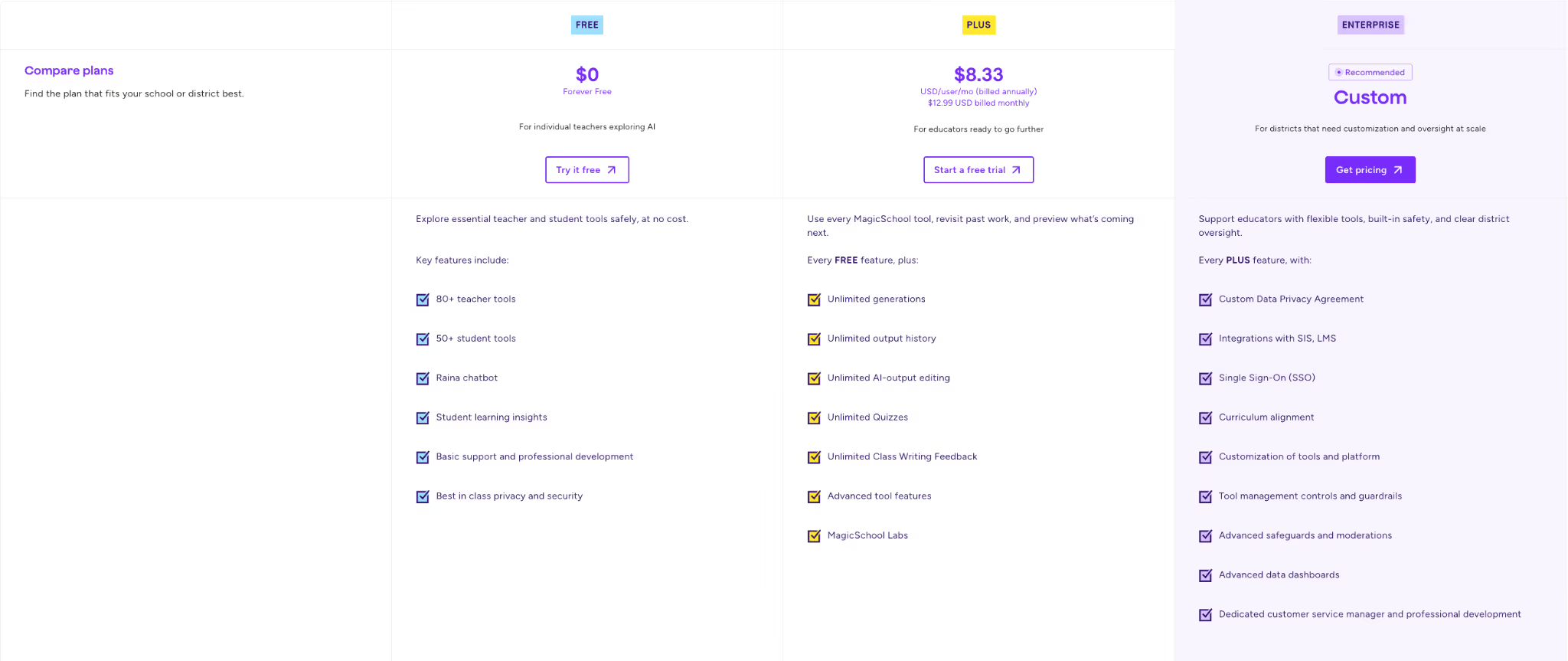
Pricing:
Education.com
Best for: Teachers who want ready-made vocabulary worksheets plus simple worksheet generators.
Key features:
Custom vocabulary worksheet generator tools: Education.com includes tools to create word searches, crosswords, matching activities, and word scrambles. You simply enter your vocabulary list and the platform generates a printable worksheet.
Large library of ready vocabulary worksheets: If you don't want to create from scratch, Education.com offers a large collection of vocabulary worksheets covering synonyms, antonyms, context clues, and academic vocabulary topics.
Custom themes and worksheet formatting: You can personalize worksheets with titles, colors, and themes. This helps teachers create engaging vocabulary practice worksheets without design work.
Vocabulary templates like flashcards and word banks: The platform also offers templates such as vocabulary cards and glossary sheets. These help turn word lists into structured classroom activities.
Printable and digital worksheet options: Worksheets can be printed or assigned digitally, making it a practical vocabulary worksheet creator for both physical classrooms and online learning environments.
Pricing:
Flint
Best for: Teachers who want an AI vocabulary worksheet generator focused on quick differentiation.
Key features:
AI vocabulary list builder: Flint can automatically generate vocabulary lists based on topics or texts. It also provides definitions and example sentences, making it useful for building structured vocabulary worksheets quickly.
AI worksheet generator for vocabulary practice: Teachers can generate vocabulary quizzes, fill-in-the-blank exercises, and comprehension questions in seconds. This makes Flint a strong option if you want a fast vocab worksheet maker.
Differentiation support: You can modify worksheet difficulty levels or create multiple versions of vocabulary practice worksheets for different student levels.
Curriculum-aligned worksheet creation: Flint allows you to tailor worksheets based on curriculum needs, which is helpful when vocabulary learning needs to connect directly to standards or units.
Flexible export options: Worksheets can be downloaded as PDFs or documents, copied into lesson materials, or saved for later use, making it practical as a workflow-friendly vocabulary worksheet maker.
Pricing
Which vocabulary worksheet maker should you choose?
If there’s one thing most teachers agree on, it’s this: vocabulary worksheets shouldn’t take longer to create than they take to teach.
The right vocabulary worksheet maker should help you move from idea → worksheet → classroom in minutes, not hours.
Here’s a simple way to think about the tools we covered:
Use Canva if you want a visual vocabulary worksheet creator with full design freedom
Use MagicSchool if you want quick AI-generated vocabulary practice worksheets
Use Education.com if you want ready-made vocabulary worksheets and puzzle generators
Use Flint if differentiation and fast AI generation matter most
Use Monsha if you want a complete vocabulary worksheet generator that handles creation, editing, and export in one place
Ultimately, the best vocab worksheet maker depends on how you like to work. If you prefer designing, go with design tools. If you prefer automation, go with AI worksheet generators. If you want an end-to-end workflow, choose platforms built specifically for teachers.
If you're looking for a vocabulary worksheet maker that has all these aspects and is free to try, Monsha is the best choice.
Pooja Uniyal works closely with teachers and schools to understand and guide how AI is being used in real classrooms today. Her work at Monsha focuses on capturing practical teaching workflows and turning them into clear, usable guidance for educators exploring AI in their daily planning.
AI lesson planning and teaching resources in one place
Join thousands of educators who use Monsha to plan courses, design units, build lessons, and create classroom-ready materials faster. Monsha brings AI-powered curriculum planning and resource creation into a simple workflow for teachers and schools.
.avif)
.gif)







.avif)
.avif)