Gemini for Education is built into Google Classroom and promises to help teachers plan faster. This guide breaks down how teachers actually use it, where it falls short, and when a classroom-focused tool may be a better fit.
AI tools are quickly becoming part of everyday teaching, and Gemini for Education is one of the most visible options - especially if you already use Google Classroom. It promises to help teachers plan lessons faster, generate classroom materials, and support students beyond school hours.
But the real question most teachers have isn’t what Gemini can do. It’s whether it actually saves time in a real classroom, or just shifts the work from writing to reviewing.
Like any AI tool for teachers ,Gemini has strengths, limitations, and very specific use cases where it works best.
In this guide, we’ll look at how teachers are actually using Gemini for Education, where it helps, where it falls short, and when a teaching-first alternative like Monsha might make more sense.
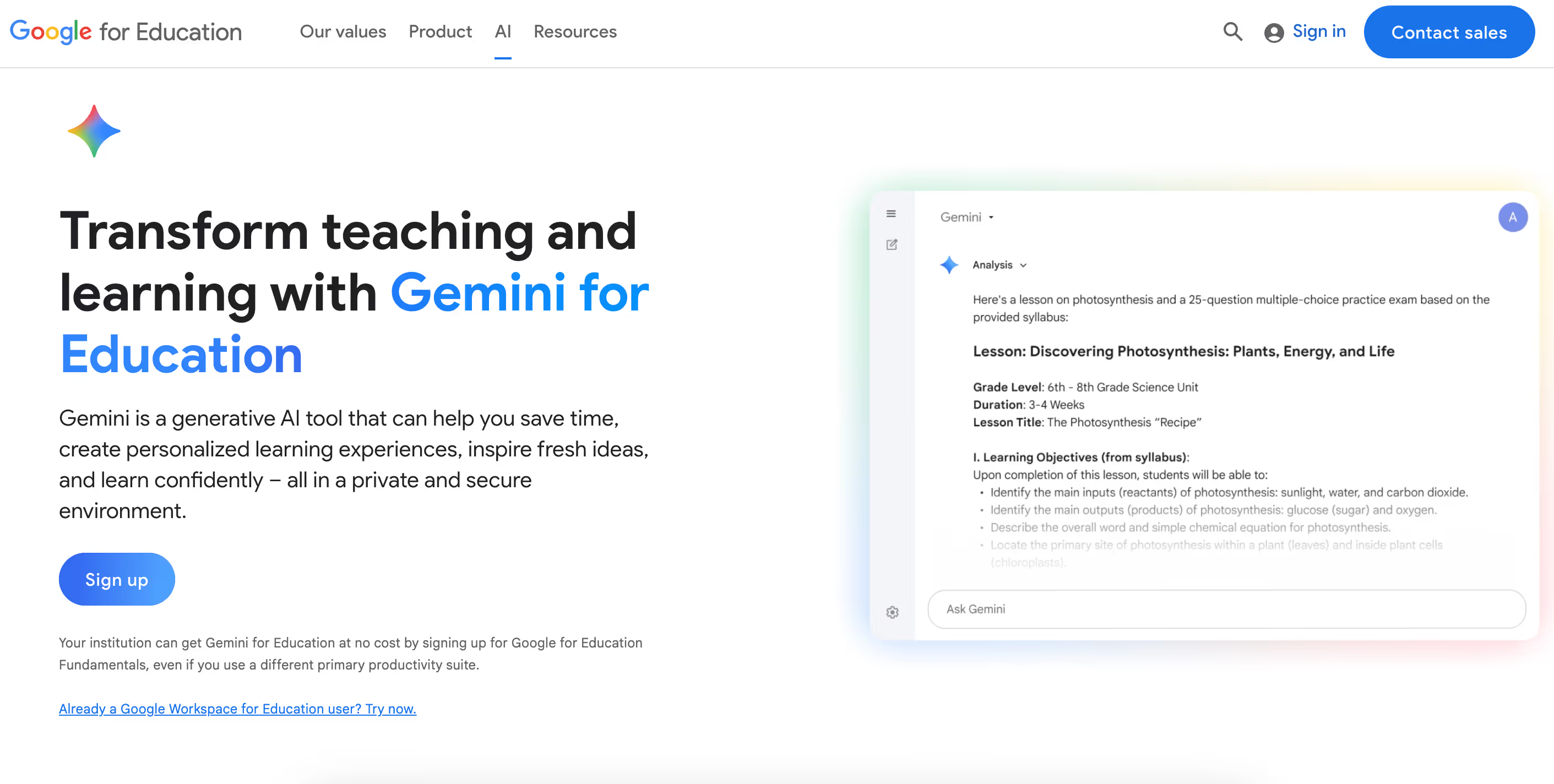
In practice, teachers aren’t using Gemini for everything. It usually shows up in a few specific moments where planning time is tight or ideas need a quick reset.
Gemini for Education is commonly used when teachers need to structure a lesson quickly or rethink how a topic is introduced. It helps generate lesson outlines, objectives, and alternative explanations when students don’t respond to the first approach.
Example:
After noticing that a concept didn’t land in class, you ask Gemini to suggest a different way to explain it or a discussion prompt to reintroduce the topic the next day.
Limitation:
Gemini doesn’t understand your classroom dynamics or student learning gaps. Its suggestions often need refinement to match your curriculum, available time, and how your students actually learn.
Teachers use Gemini to quickly create practice questions, quizzes, and worksheets when they need materials on short notice. It’s especially useful for generating multiple variations of questions for revision or formative checks.
Example:
Before a short quiz, you ask Gemini to generate multiple-choice and short-answer questions based on the topic you taught that week.
Limitation:
Gemini can produce incorrect answers or poorly worded questions. Teachers still need to verify accuracy, alignment with standards, and difficulty level before using them in class.
Gemini is often used to rewrite content at different difficulty levels so the same concept can be taught to students with varying reading or comprehension abilities.
Example:
You ask Gemini to simplify a passage for struggling readers while keeping a more detailed version for advanced students.
Limitation:
The simplified versions may lose important nuance or oversimplify key ideas. Teachers often need to review and adjust language to ensure accuracy and clarity.
Some teachers use Gemini to create AI-powered study helpers that summarize material or answer student questions outside class hours.
Example:
You upload class notes and allow students to use Gemini to revise key topics before an exam.
Limitation:
Students may rely on AI summaries instead of engaging with original material. Teachers also need to monitor for incorrect explanations or misuse.
Gemini can assist in drafting slide content or lesson scripts, helping teachers prepare presentations or flipped-classroom materials faster.
Example:
You ask Gemini to outline slide content or draft a short explanation script for a recorded lesson.
Limitation:
The outputs often require design polish and fact-checking. Visual accuracy and presentation quality still depend on the teacher.
Teachers also use Gemini to draft routine communication such as assignment instructions, feedback comments, or parent updates.
Example:
You ask Gemini to rewrite a classroom announcement or parent message in clearer, more neutral language.
Limitation:
Sensitive communication still requires human judgment. Tone and context often need adjustment before sharing with parents or students.
One thing teachers notice pretty quickly is that Gemini can be confidently wrong. It usually sounds sure of itself, even when the information isn’t fully accurate.
That’s fine for brainstorming, but it becomes a problem when you’re creating assessments, explaining factual concepts, or sharing material directly with students. In those cases, you can’t skip the review step. So while Gemini helps you create faster, you often end up spending that saved time checking and correcting the output instead.
There’s also the practical side of using AI with students. Google has added safety filters and admin controls, and it’s clear they’re thinking about responsible use.
But schools still need to decide who gets access, at what age, and for what purpose. Teachers and students need basic AI literacy, and admins have to manage permissions, monitoring, and consent. For smaller schools or teams without strong tech support, this setup work can feel like more effort than expected.
Finally, there’s the teaching nuance.
Gemini doesn’t know your students, their learning gaps, or what usually works in your classroom. It can generate content quickly, but it can’t judge whether an explanation will actually click for your class.
When you need consistent, curriculum-aligned materials - like differentiated worksheets, rubrics, or IEP-friendly resources - the time spent editing and adapting AI output adds up. At some point, teachers start asking whether they’re really saving time, or just moving the work around.

When I first tried Monsha, the difference was immediate, it didn’t feel like I was talking to an AI chatbot, it felt like I was working inside a teaching tool.
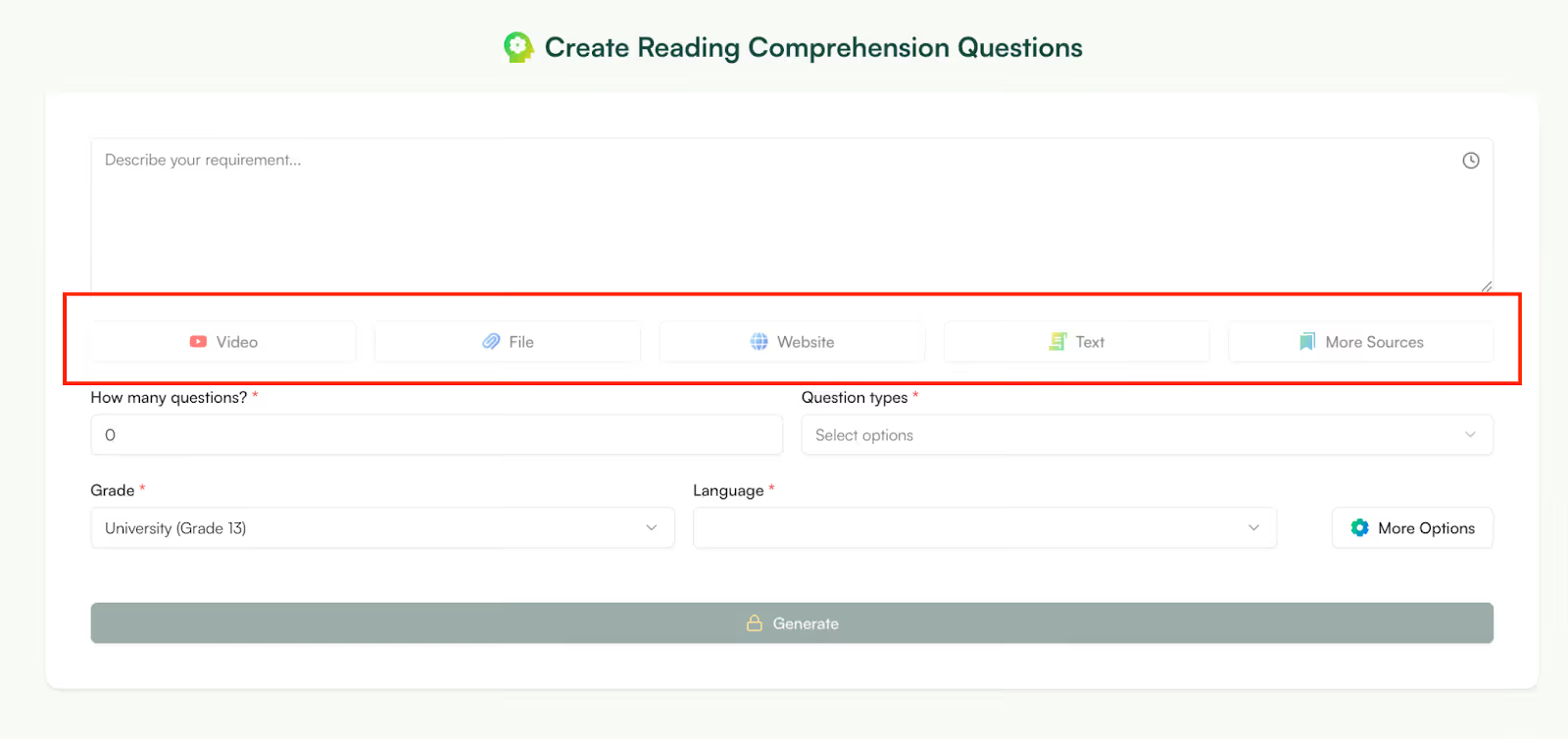
Monsha is built specifically for teachers who want to create classroom-ready materials, not just generate ideas. Instead of asking you to prompt endlessly, it asks you to work the way teachers already do - with documents, videos, links, and clear instructional goals.
You can creating creating resources from:
Instead of summarizing for you and stopping there, Monsha helps you teach from that material.
Instead of generating a paragraph and then wondering what to do next, Monsha helps you move straight to outputs you can use in class:
You’re not stitching things together from multiple tools, it’s one workflow.
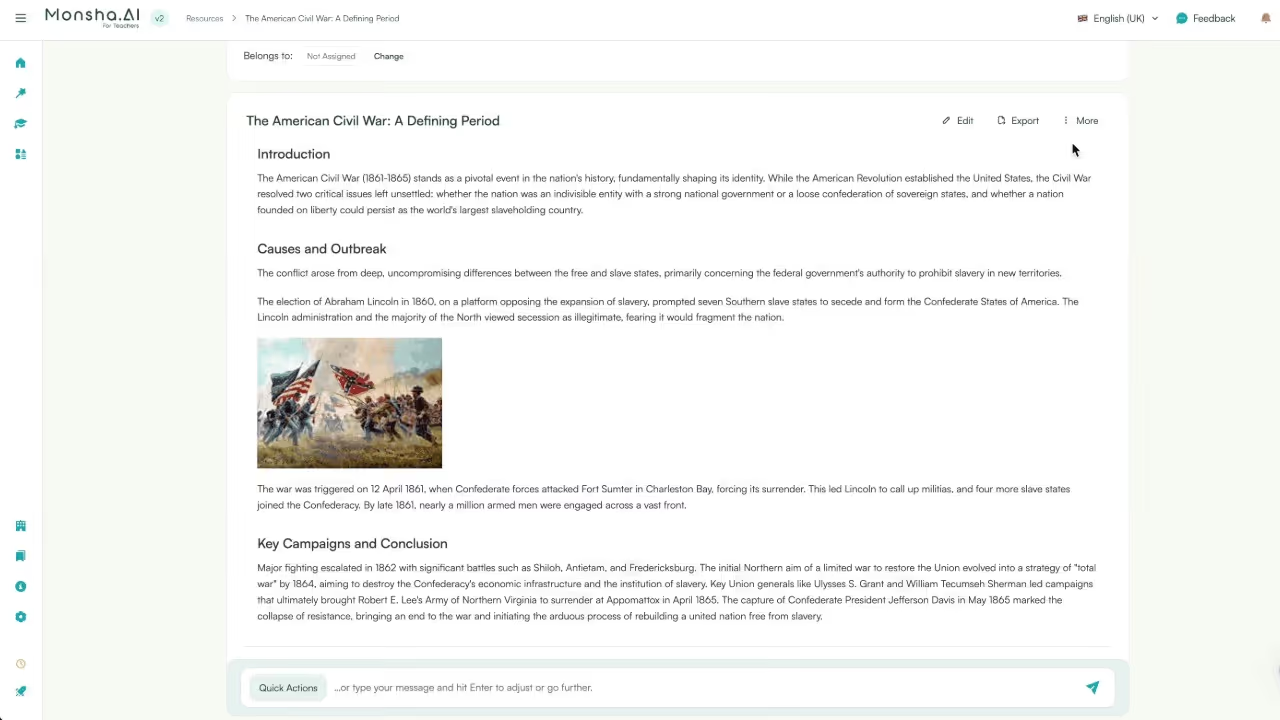
This is one of the biggest time-savers I’ve seen. Once you’ve created a resource be it a worksheet, presentation or lesson plan, you can convert it into multiple passages. For example, you can convert a worksheet into handouts or handouts to worksheets.
Gemini can’t do this because it doesn’t think in terms of connected instructional resources.
Monsha’s editor is very powerful yet very easy to use. With Gemini, if something’s off, you often regenerate the whole thing but with Monsha, you tweak:
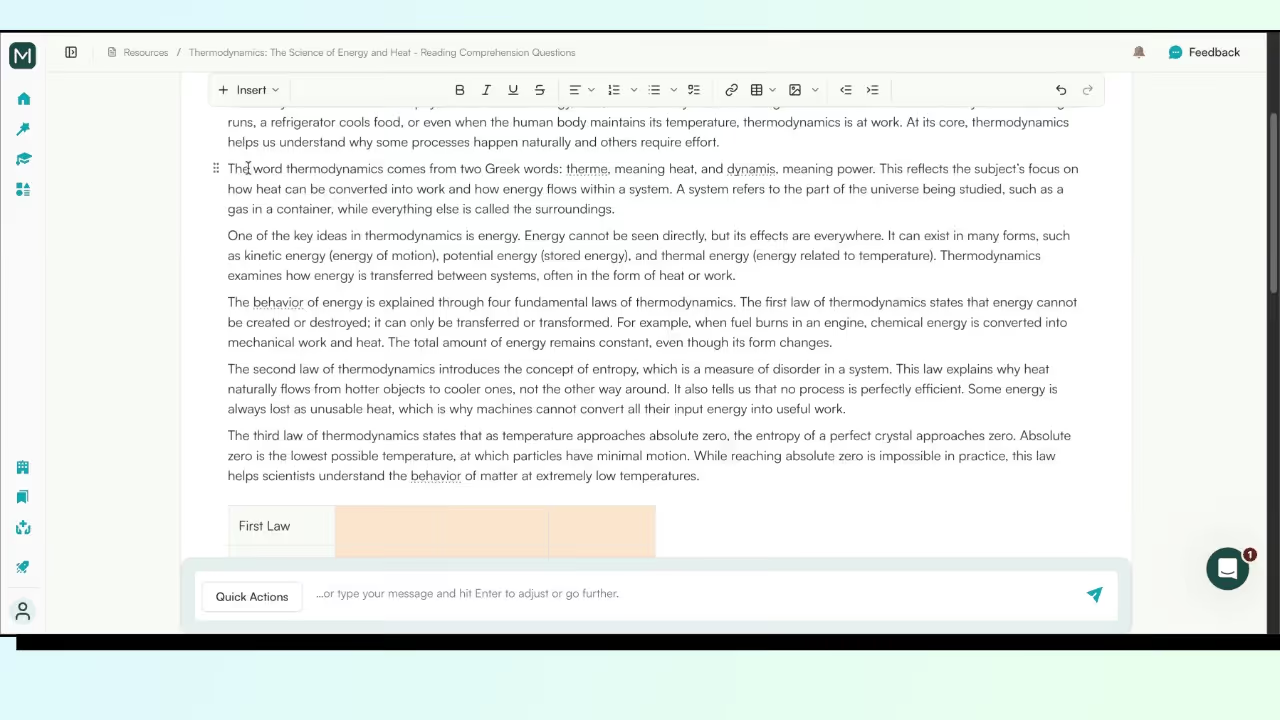
That saves time and mental energy, especially when you’re preparing for multiple classes.
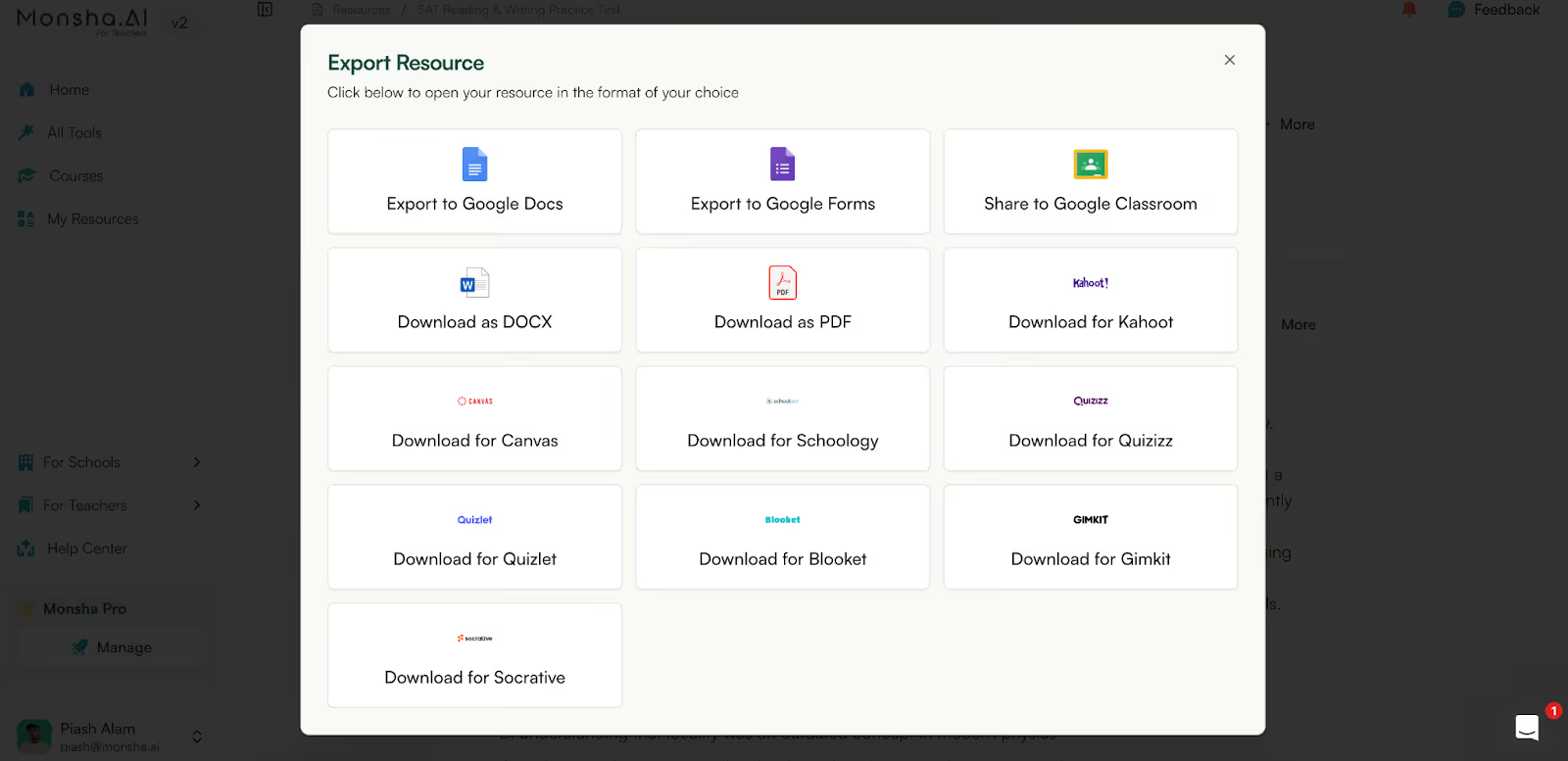
Monsha is built for the school ecosystem. While Gemini can only export as a PDF or .xsv file, Mosha can export your resource to Google Classroom, Kahoot, Canvas, Schoology, Quiz and many more formats.
Here’s a Table on How Monsha is a Great Alternative to Gemini:
Gemini for Education can be worth using - especially as a drafting and brainstorming tool inside Google Classroom. It’s helpful for generating ideas, speeding up first drafts, and supporting planning when time is tight.
But it’s not a hands-off solution. Teachers still need to verify accuracy, adapt content to their students, and manage how AI is used safely in the classroom.If you’re comfortable editing AI outputs and already rely heavily on Google’s ecosystem, Gemini can fit into your workflow.
However, if you’re looking for classroom-ready lessons, connected resources, and materials designed specifically around teaching needs, tools like Monsha reduce the amount of rework required. In the end, the best tool is the one that gives you back the most time - not just at the drafting stage, but all the way through lesson delivery.
Gemini for Education is available to many schools using Google Workspace for Education, but access depends on your institution’s plan and admin settings. Some features may be limited or controlled by your school administrator.
Yes. Gemini can be used alongside tools like Google Classroom and Google Workspace apps to help with lesson planning, drafting materials, and classroom communication. However, how deeply it’s integrated depends on admin permissions and enabled features.
Google includes safety filters and administrative controls for student use. That said, schools still need clear policies, age-appropriate access rules, and guidance on how students should use AI responsibly in learning.
No. Gemini helps with drafting and brainstorming, but teachers still need to adapt lessons to their curriculum, classroom constraints, and student needs. It’s a support tool, not a replacement for professional judgment.
Gemini can generate quiz questions and worksheets, but teachers should always review them. AI-generated content can include factual errors or misaligned questions, especially in subjects that require precision.
Gemini for Education is integrated into Google’s education ecosystem, while ChatGPT is a standalone, general-purpose AI tool. Both help with drafting and ideation, but neither is built exclusively for classroom-ready outputs without teacher review.
It can save time during the drafting stage, but many teachers find they still spend time reviewing, correcting, and adapting content. Whether it saves time overall depends on how much editing your workflow requires.
Teachers often look for alternatives when they need curriculum-aligned, classroom-ready materials with minimal editing - such as structured lesson plans, connected worksheets, rubrics, or IEP-supporting resources.
Gemini can help generate different versions of content, but differentiation often requires additional refinement. Teachers usually need to adjust language, examples, and difficulty levels manually.
Many teachers use Gemini alongside teaching-focused tools. Gemini works well for brainstorming and drafts, while specialized education tools can reduce rework by producing classroom-ready materials.




AI in Education Content
Pooja Uniyal works closely with teachers and schools to understand and guide how AI is being used in real classrooms today. Her work at Monsha focuses on capturing practical teaching workflows and turning them into clear, usable guidance for educators exploring AI in their daily planning.
Join thousands of educators who use Monsha to plan courses, design units, build lessons, and create classroom-ready materials faster. Monsha brings AI-powered curriculum planning and resource creation into a simple workflow for teachers and schools.
Get started for free


.avif)
.avif)