Build classroom-ready graphic organizers with the AI graphic organizer generator made for teachers. Pick from 20+ of the most-used layouts like Venn diagrams, KWL charts, Frayer models, and story maps, or describe your own, and Monsha fills it in for you from any topic, text, or YouTube video. Every organizer comes back on-grade and ready to edit, print, or assign, so you start from a finished draft instead of a blank template.
Monsha makes graphic organizer creation flexible, powerful, and refreshingly simple.

Choose from 20+ organizer types or the Custom option, then add your topic, paste text, drop in a website or YouTube link, and set your grade and language.

Monsha generates a complete organizer that stays true to your chosen layout, with the depth and vocabulary matched to your grade level.

Add an answer key, create a blank version for students, change the grade, or translate it, then edit any part inline and export print-ready.
Monsha takes you from a blank page to a finished, differentiated organizer without leaving the tool. Pick a layout, generate it from your own material, adapt it for every learner, and send it to class.
Start with the organizer teachers actually use, ready to go. Choose from 20+ pre-built layouts, each true to how it's meant to teach, or use the Custom option to describe your own or match a reference image you already have.

.gif)

Don't fill in another blank template. Monsha builds your organizer from your actual lesson material, whether that's a topic, a textbook excerpt, an article, or a YouTube video, and hands it back populated and matched to your grade.
Make one organizer work for every student without starting over. Generate an answer key, strip it to a blank version for students, shift the grade band, or add scaffolds, all from the same page.

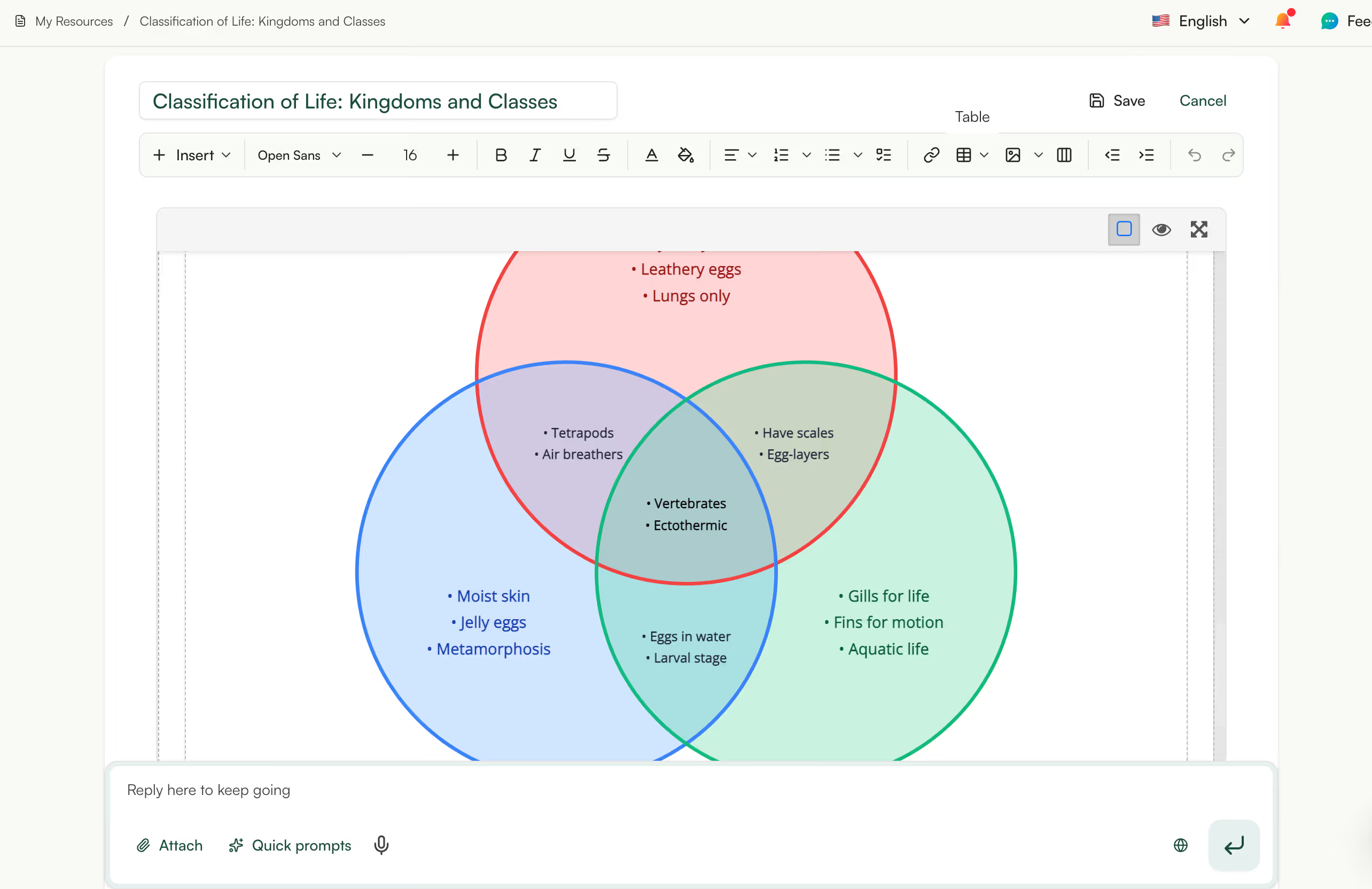
Get the organizer exactly how you want it, then take it anywhere. Edit any element directly, then export as a print-ready file or a clean image for your slides, or send it straight to your class.
This graphic organizer generator is one of the free AI tools for teachers built by Monsha. Alongside it you can create worksheets, quizzes, lesson plans, slides, rubrics, and full units, all in one place. Start free, no credit card needed, and build your first organizer in minutes.
Try it nowA graphic organizer is a visual tool that helps students arrange information so relationships between ideas become clear. It uses shapes, columns, webs, or charts to break down a concept, a story, or a process into parts students can see and fill in. Teachers use them across every subject to support reading comprehension, writing structure, vocabulary, and critical thinking. Common examples include Venn diagrams, KWL charts, story maps, and concept maps.
Different layouts suit different thinking tasks. Use compare-and-contrast organizers like Venn diagrams and double bubble maps when students need to spot similarities and differences, sequencing organizers like timelines and sequence chains when order matters, and brainstorming organizers like KWL charts and concept maps when the goal is generating and connecting ideas. For reading and writing, story maps, plot diagrams, and the hamburger paragraph organizer help students break down texts and structure their own. The right organizer depends on the skill you want students to practice, which is why Monsha offers 20+ types to match the task.
What are graphic organizers used for in the classroom?
Teachers use graphic organizers to help students process, organize, and retain information. They turn abstract ideas into a visual structure, which supports reading comprehension, pre-writing, note-taking, vocabulary building, and review. They are especially useful for differentiation, giving students who need more support a clear framework to work within. They also double as a quick formative assessment, since a completed organizer shows you what a student understands.
Which graphic organizers work best for reading comprehension?
Story maps, KWL charts, main idea and supporting details organizers, and cause-and-effect chains are among the most effective for reading comprehension. They help students identify structure, track key ideas, and see how parts of a text connect. For character analysis, a character traits web pushes students to back up each trait with text evidence. With Monsha you can generate any of these from the actual passage your class is reading, so the organizer fits the text instead of being generic.
What types of graphic organizers can I make with Monsha?
Monsha includes 20+ graphic organizer layouts, plus a Custom option for anything else:
Can I create a custom graphic organizer that isn't in the gallery?
Pick the Custom option and describe the layout you want, including the structure, sections, and purpose, and Monsha builds it for you. If you already have an organizer you like, upload it as a reference image and Monsha will mimic that layout with your content. This covers anything outside the standard gallery, including the formats you find on Pinterest or TPT and want adapted to your lesson. You get the same editing and export options as the pre-built types.
Can Monsha build an organizer from a YouTube video, article, or my own text?
This is one of the biggest time-savers in the tool. Instead of starting from a blank template, you can attach a YouTube video, paste a website link, drop in a file, or add a text excerpt, and Monsha builds the organizer from that exact material. You can also pull in another Monsha resource you have already made. The result is an organizer grounded in your real lesson content rather than a generic example.
Can I get both an answer key and a blank version for students?
Both are one click away from the same organizer. Use Add answer key to generate a filled version with example correct answers, and use Blank for students to strip the content while keeping the labels and prompts students need. This means you can hand out the blank version in class and keep the completed key for yourself. You can also add sentence starters to scaffold students who need extra support.
Can I change the grade level or translate an organizer?
You can adjust an organizer to a different grade band, from K-2 up to 9-12, and Monsha rewrites the vocabulary, sentence length, and depth to match while keeping the layout intact. You can also translate the entire organizer into any of 60+ languages with the original structure preserved. Both options work on an organizer you have already generated, so there is no need to start over. This makes it quick to differentiate one organizer for a mixed-ability or multilingual class.
Can I edit the organizer after it's generated?
Every organizer is fully editable right on the page. You can change any element directly inside the organizer, fix wording, adjust labels, or refine the content, with the layout kept intact. You can also keep refining through chat, asking Monsha to expand a section, simplify the language, or add more items. Nothing is locked, so you can shape it until it fits your class exactly.
What formats can I export or print organizers in?
Organizers export as print-ready PDF and DOCX, or as PNG, JPG, and WEBP images for slides and displays. You can also send them to Google Docs, export to MS Word through OneDrive, or share straight to Google Classroom. The image formats are handy when you want to project an organizer or drop it into a presentation. Whatever you choose, the organizer keeps its layout and formatting.
How does an AI graphic organizer generator work?
An AI graphic organizer generator takes your input, such as a topic, a text, or a video, and produces a structured organizer filled with relevant content. With Monsha you choose a layout, add your source material, and set your grade and language, then the AI generates an organizer that matches the layout's teaching purpose and your students' level. You stay in control, editing, differentiating, and regenerating until it is right. It removes the manual work of building and populating the organizer by hand.
How is this different from Canva or a template site?
Template sites and design tools give you a blank organizer that you still have to fill in yourself, one box at a time. Monsha generates the organizer already populated from your own lesson material and matched to your grade level, so you start from a finished draft. It is also built for teaching, with 20+ pedagogically structured layouts and one-click moves like answer keys, blank student versions, grade changes, and translation. You get a classroom-ready resource, not just a nice-looking template.
Are AI-generated graphic organizers accurate and classroom-ready?
Monsha produces organizers that are structured for teaching and grounded in the source material you provide, which keeps the content relevant and on-grade. That said, you know your students and standards best, so the tool is designed for you to review and refine the draft before using it. Every organizer is fully editable, and you can simplify, add detail, or regenerate any part in seconds. Think of it as a strong first draft that gets you most of the way there.
Is Monsha's graphic organizer generator free?
The graphic organizer generator is available on Monsha's free plan and free trial, like the rest of Monsha's tools for teachers. You can sign up for a free Monsha account and start creating organizers without a credit card. Paid plans add higher usage limits and access to the full platform. Most teachers can get real classroom value from the free tier alone.
How do I create my first graphic organizer in Monsha?
Sign up for a free Monsha account, open the Graphic Organizers tool, and describe what you need in the requirement field. Pick a layout from the gallery or choose Custom, add any source material like a text or video, set your grade and language, and hit Generate. Within seconds you get a filled organizer you can edit, differentiate, and export. It works for any subject and grade, so you can use the same tool across your whole teaching load.

Palm Beach County School District, Florida

I’ve been speaking to everyone about the ease of your site. I enjoyed the fact that there were different question types and that you were able to modify the question levels or styles without much effort. Using it almost every day to redo and update assignments.
I really am enjoying Monsha and can’t wait to spread the word about it.

Central Holmes Christian School, Lexington, MS
I use Monsha a lot. Sometimes I even feel like I’m bothering y’all with how often I’m on it 😅 but I really appreciate this app so much. Even during summer break, I’m using it to get ahead on lessons for next year.
.avif)
Ohse Home School, Oklahoma
I love this platform - this has made homeschooling easier for me from planning lessons to creating spelling, reading and English worksheets.
It's been a life-saver for my school year no matter what your religion may God bless you all!

Zenith International School, Malaysia
Your presentation content is great based on the pdf file I provided. I teach maths in my case i needed to make presentation more interesting for the kids, not boring blank pages with text. Like artworks, graphics or real images that relate to my subject. Thank you for that 😍

Professional Learning Developer
This tool is fantastic! This really makes it more of an all-in-one-stop shop for me now that you've added the PPT tool upon my request.
It is very intuitive as far as the prompt is concerned. And I like the options to add links, content, previous resources, and especially the YouTube feature.

High school math teacher in the US
The worksheets look great. Thank you so much for taking care of this, it's so rare to find a resource that works with latex for math! I'm thrilled!

Khuangnapittayakun School, Thailand
I can create an entire course to include grading rubric within minutes when before it would take me weeks.
In S.E. Asia, the resources are whatever teachers can pirate but Monsha has changed that for me.. now I can create and enjoy the task for a change.

Italian teacher and trainer
Monsha was a wonderful discovery, and I always recommend it in my AI training courses!
The tools they offer are all very effective, but my favorite is "Comprehension Questions," one of the best I've tried across various platforms! Great work!

Maths Teacher, The Teach for Nigeria
I've shared this tool to my colleagues here in Nigeria and they are already falling in love with it.
I actually do use Monsha for everything. From baseline assessment to lesson planning to formative evaluations and of course to summative assessment.

English Teacher, Educación de la prov. Argentina
I was fortunate to chat directly with you guys (creators). Every suggestion I shared was received with enthusiasm, you worked on it and got back sincerely.
I have been impressed with how you improve it based on the actual needs of educators. And kept it clean and simple.
Join thousands of educators who use Monsha to plan courses, design units, build lessons, and create classroom-ready materials faster. Monsha brings AI-powered curriculum planning and resource creation into a simple workflow for teachers and schools.
Get started for free
